
Before replacing the C-arm, check the table
A suitable table or approved accessory can change which C-arm purchase makes sense. Compare the pair in the positions you actually need.
Editorially reviewed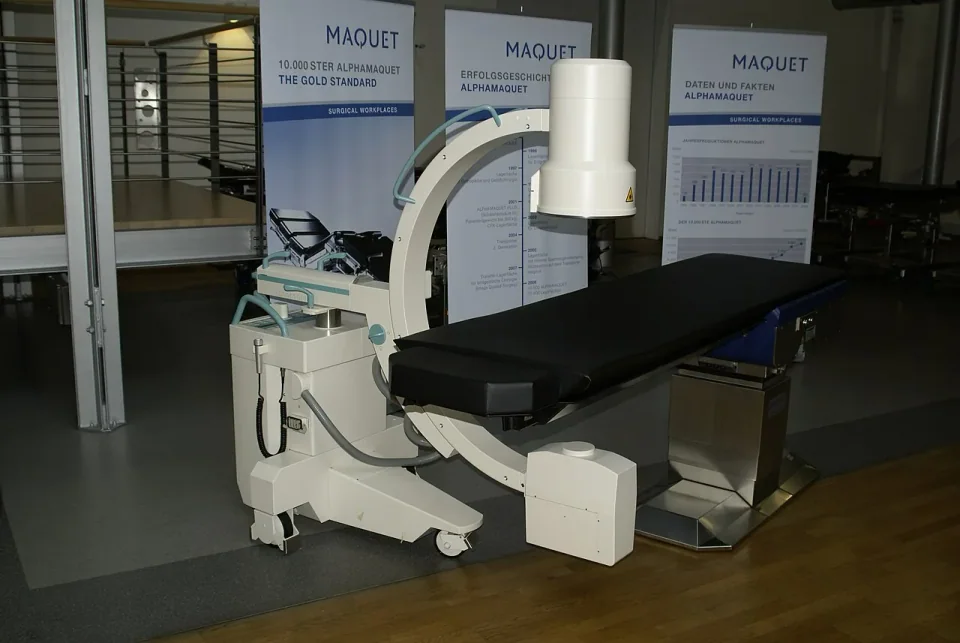
About this photograph
This archive photograph illustrates the equipment setting; it does not show or verify the exact device, configuration or service compared in this article.
The decision at a glance.
- Start here
- Identify the obstructed view before choosing which component to replace.
- Spend more when
- An approved accessory or dedicated table removes a documented limitation.
- Watch the budget
- Include the complete table/accessory and acceptance package.
- Check the support
- Match both models, generations and limits to the demonstrated pair.
Ask the supplier
- Which item prevents the required view?
- What limit applies with this accessory and position?
- Can the supplied pair repeat the demonstrated setup?
Locate the obstruction before buying around it
If the C-arm produces acceptable images but cannot reach a required view, a new detector may solve nothing. Identify whether the obstruction comes from the table base, limited travel, accessories, patient position or the C-arm's own movement. That finding determines whether to keep the equipment, change an accessory, buy an imaging table or replace the C-arm.
Assess the actual pair. Two products described as radiolucent and mobile do not automatically work together. Use the team's required views and positions, the intended patient range and a complete accessory list. The aim is a usable procedure setup, not a better number on either brochure.
Case one: keep the table and change its imaging access
A supported general surgical table may need only an approved extension when the limitation is access over part of the body. STERIS lists its 44-inch imaging extension for specified tables, including 4085, with different accessory versions. This provides a concrete keep-and-adapt route to compare with buying another table.
The important catch is the resulting configuration's limit. The same STERIS page gives 4085-with-extension capacities of 400 lb with the tabletop centered and 300 lb with slide induced. Those published figures illustrate why the table's headline capacity cannot be carried over to an accessory arrangement. The exact operator instructions and qualified assessment govern use; this is not a positioning prescription.
Case two: buy travel that the workload needs
For a service needing repeated longitudinal and lateral repositioning, a dedicated imaging table may address the limitation more directly. The CMAX X-Ray specification lists longitudinal slide to 27.5 inches and total lateral slide of 10 inches. It also distinguishes total imaging length from the shorter window available for 360-degree imaging, and changes those figures when extensions are fitted.
That distinction is more useful than counting table movements. Have the team identify the required span and angles, then demonstrate them with the proposed C-arm. A long tabletop alone does not establish unobstructed access around its base. These are documented table features, not a certification that a particular C-arm pairing will fit.
Include the pad, rails and people in the comparison
Measure the intended working arrangement with pads, positioning aids, side rails, supports and other required equipment present. They affect the space the team actually has. Confirm each accessory's approved attachment, limits and cleaning requirements instead of assembling a package by appearance.
Rehearse staff access, display sightlines, cables, footswitches and parking. A one-piece C-arm such as OEC One CFD changes the display/cart arrangement; it still has to work around the table. Include doorway access and the route for moving or replacing either item. A theoretical view is of little value if the working team cannot occupy the room.
Compare four purchase routes on the same case
Keeping the pair has the lowest changeover burden when the required views already fit. An approved accessory can be attractive when it removes one defined obstruction without compromising the accepted workload. A dedicated table deserves the premium when its access and movement are used repeatedly. Rental may help with a limited programme, provided the exact configuration, setup and return arrangements are agreed.
Price the whole route: accessory and pad, adapters, delivery, installation, training, acceptance and continuity during repair. Do not call the extension cheaper until its compatibility and usable limits are confirmed; do not call a new table necessary until the simpler route has been assessed.
Make the paired demonstration part of acceptance
Record the models, generations and accessories used in the comparison. Have qualified clinical and technical staff approve the required movements and images, including the relevant loaded-position limits. Preserve the demonstration evidence with the purchasing specification so a substituted table or pad cannot quietly change the deal.
Buy the component that removes the demonstrated constraint. When the pair already works and can be maintained, retaining it may leave more money for the detector, training or repair reserve that the service actually needs.
Compare the options.
Keep
- Capability
- Current accepted views.
- Best fit
- No material fit problem.
- Cost to watch
- Maintenance.
Adapt
- Capability
- Remove one documented obstruction.
- Best fit
- Approved combination meets the brief.
- Cost to watch
- Accessory and changed limits.
Dedicated table
- Capability
- Add required access and travel.
- Best fit
- Repeated workload uses the gain.
- Cost to watch
- Complete table package.
Rent
- Capability
- Obtain a specified pair for limited work.
- Best fit
- Short programme with a viable exact offer.
- Cost to watch
- Delivery, setup and term.
Option notes, costs & support 3 options
Existing table plus approved imaging extension
Targeted adaptation
- Best for
- A defined access obstruction on a supported table.
- Why consider it
- May preserve useful equipment while changing the imaging window.
- The trade-off
- Accessory/position limits can differ substantially from the base table.
- Price & package
- Include extension, pad, adapters and acceptance.
- Support
- Verify exact table generation and accessory documentation.
CMAX X-Ray dedicated imaging table
Movement-led alternative
- Best for
- Repeated imaging requiring the documented travel.
- Why consider it
- Published travel and distinct imaging windows make a comparison possible.
- The trade-off
- C-arm pairing and procedural access still need demonstration.
- Price & package
- Include accessories, controls, delivery and service.
- Support
- Verify the purchased generation and local repair route.
Keep the accepted pair
No-change baseline
- Best for
- Required views already work.
- Why consider it
- Avoids unnecessary changeover.
- The trade-off
- Does not resolve an unmet access requirement.
- Price & package
- Fund maintenance and eventual replacement.
- Support
- Keep condition and movement checks current.
Budget for the complete service.
Paired-system change cost = equipment or accessory + integration and acceptance + support + interruption provision.
- Imaging access
- Accessory limits
- Table travel
- Room and staff fit
- Repair continuity
Before you commit.
- Identify both models and every accessory.
- Map required views to actual geometry.
- Use configuration-specific loaded-position limits.
- Demonstrate staff and cable access.
- Record acceptance and component substitutions.
Further checks & evidence limits
Questions to resolve
- Which item prevents the required view?
- What limit applies with this accessory and position?
- Can the supplied pair repeat the demonstrated setup?
What the evidence does not establish
- No particular C-arm/table pair is approved by this guide.
- No current installed-price or rental comparison verified.
Sources & supporting evidence.
Manufacturer claims and seller offers are identified below. Prices apply to the stated offer and review date; confirm availability, configuration and delivered cost.
- STERIS 44-inch Imaging ExtensionSTERIS · manufacturer · checked October 18, 2026
Compatibility list and model/position-specific patient-capacity table read. Exact extension and table generation matter; no general 4085 maximum substituted.
- CMAX X-Ray Image-Guided Surgical TableSTERIS · manufacturer · checked October 18, 2026
Written mechanical table distinguishes longitudinal/lateral travel and total versus 360-degree imaging windows, with and without extensions. No paired C-arm fit certified.
- OEC One CFDGE HealthCare · manufacturer · checked October 17, 2026
Current US page describes a one-piece system, 27-inch 4K display, two CMOS detector sizes, four software configurations and five-minute standby transport power.
Put the guide to work.
Send MMS your equipment list, destination and budget. We can help you compare a complete package.
Discuss your equipment